How to Use Posterize by Color to Simplify a Painting Reference
Painters talk about value constantly, and for good reason. Value is structural. If the values are wrong, the painting usually fails no matter how sensitive the color is.
But color has structure too.
When a painting feels muddy, overmixed, or strangely more complicated than the subject, the problem is often not that the painter cannot see color at all. It is that they are seeing too much of it at once: every small temperature shift, every reflected note, every tiny variation caused by texture, compression, or lighting.
This is where Posterize by Color becomes useful. It reduces the image to a smaller set of dominant colors, so you can see the broad color architecture before getting lost in the noise.
What Posterize by Color Does
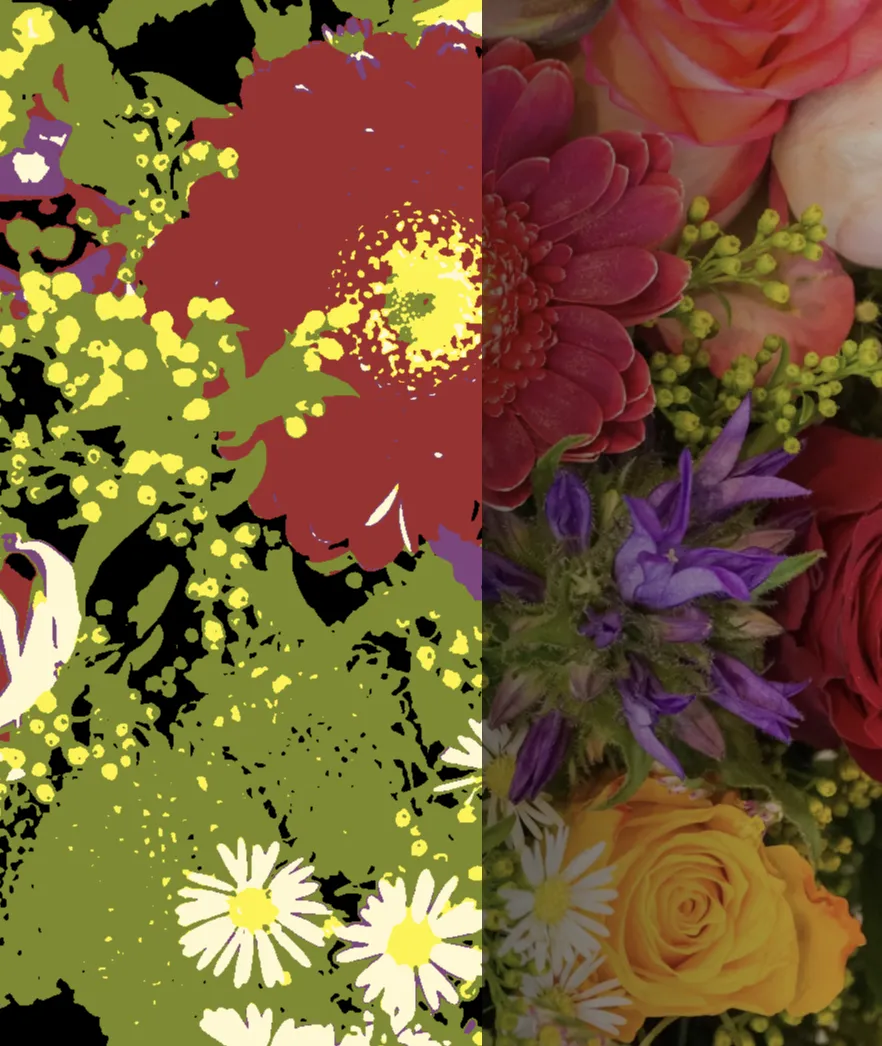
Posterize by Color analyzes an image and extracts a small number of representative colors. It then maps every pixel to the nearest one of those colors. Instead of a continuous photograph, you get a flattened version of the subject built from a limited palette.
The effect is not grayscale posterization. It is closer to a color separation, or a simplified print. Instead of asking, where are the lights and darks?, it asks: what are the main color families in this image, and how are they distributed?
That makes it useful for painters who want to simplify a reference before mixing paint, especially when the original photo is busy, over-detailed, or full of small color variations that are not actually important to the statement of the painting.
Why This Helps Painters
A camera records far more color variation than most painters want to reproduce literally. Skin has small shifts in temperature. Fabric picks up reflected light. Foliage can break into hundreds of slightly different greens. A photograph contains all of it at once.
If you try to answer every one of those notes individually, you usually get one of two bad outcomes: either the painting becomes noisy and fragmented, or you overmix everything into mud because the problem was never clearly simplified.
Posterize by Color helps by forcing a reduction.
- At 4 to 6 colors, you can usually see the large family relationships clearly.
- At 8 to 12 colors, you begin to recover useful nuance without drowning in variation.
- At 20 or more colors, the result starts moving back toward the full complexity of the source.
Most of the time, the useful question is not what exact color is every small patch? It is what are the few dominant color ideas that hold this image together?
Posterize by Color vs. Posterize by Value
These two modes solve different problems.
Posterize by Value helps you understand tonal structure. It is for checking where the light and shadow masses sit, whether the value design reads, and whether your painting is structurally sound.
Posterize by Color helps you understand palette structure. It is for seeing the dominant color groups in the subject, simplifying mixtures, and deciding which color relationships actually matter.
If you are unsure which to use, the practical answer is simple:
- Use By Value when the painting is failing structurally.
- Use By Color when the painting is becoming chromatically confused.
In practice, many painters will use both. One clarifies the value design. The other clarifies the palette design.
How Lucida's Posterize by Color Works
In Lucida, Posterize by Color extracts the most representative colors in the image and remaps the entire image to that limited set. The result is a simplified palette view of the subject. The User Manual's posterization section covers the related controls in more detail.
You control how many colors are extracted, how smooth or broken-up the simplified shapes become, and how much contrast is restored afterward. The extracted palette also appears as editable swatches, sorted from dark to light.
That last part matters. A simplified image is useful on its own, but the palette swatches make the result more actionable for painters. You are not only seeing the image become simpler. You are also seeing the actual dominant colors the simplification is built from.
Those swatches can also be overridden manually. That makes the tool useful not only as a bridge between the colors in the reference and the paints you actually have on your palette, but also as a way to experiment. You can replace one color with another and see what happens, effectively editing the reference and designing its color structure more deliberately instead of accepting the photo as fixed.
One practical limitation is important to understand: Posterize by Color works on still images or paused video frames, not on live moving video. That is intentional. Color extraction needs a stable frame to produce a meaningful result. On a moving feed, the palette would shift constantly and become useless.
A Practical Workflow for Posterize by Color
Here is a simple way to use it in the studio:
- Start small, then increase until the palette starts to make sense. Begin at 4 to 6 colors, but do not treat that number as sacred. Because the extracted colors are averages, some steps can feel surprisingly useless or disconnected, especially in images with a lot of color variety. A 5-color result, for example, may collapse several different notes into a few muddy averages that do not yet describe the subject clearly. The useful result is individual to each image, so there is no single correct number. Start low so you can see the broad organization, then increase the count gradually until the color families begin to read coherently.
- Identify the major color families. Ask what the image is really built from. Is it mostly warm skin against cool background? A few blue-greens against earth colors? A narrow high-key palette with one accent?
- Increase the count only when necessary. If the image is oversimplified, move up to 10 or 20 colors. Add complexity only after the large structure is clear.
- Adjust smoothness if texture is creating junk colors. Fabric weave, pores, brushwork in a source image, and foliage detail can all produce color noise. A bit of smoothing usually gives a cleaner palette.
- Use the swatches as mixing anchors. Look at the extracted palette and ask which colors are central to the image, and which are secondary. That gives you a better starting point for mixing than reacting to every small patch in the photo.
- Return to the original image after simplifying. As with value posterization, the simplified view is a tool for clearer seeing, not a replacement for observation.
When It Is Especially Useful
Posterize by Color tends to help most in a few recurring situations:
- Portraits with subtle temperature shifts. It helps separate the major warm and cool families without getting trapped in every tiny transition.
- Landscapes full of green noise. It reduces a mass of slightly different greens into a more understandable color structure.
- Reference photos with bad compression or clutter. It can cut through the accidental color noise that makes a photo harder to paint from than the subject really is.
- Palette planning before a session. It gives you a fast read on what color families you will probably need before you start mixing.
Common Mistakes
-
Using too many colors immediately.
If you start at 16 or 20 colors, you defeat the point of simplification. -
Treating the extracted palette as sacred.
The palette is a guide, not a law. Painters still need judgment. Sometimes the painting needs a stronger chroma note, a warmer neutral, or a cleaner separation than the extracted average gives you. -
Using color posterization when the real problem is value.
If the painting is structurally broken, color simplification will not rescue it. Solve the value design first. -
Forgetting that stillness matters.
Posterize by Color is most useful when the source frame is stable. If the source is moving, pause it before you analyze the palette.
Getting Started
The fastest way to try Posterize by Color on your current reference is simple:
- Open Lucida in your browser.
- Load a reference image into one of the two panes.
- Open the Posterize panel and switch to By Color.
- Start with 4 to 6 colors.
- Adjust smoothness if the palette looks noisy.
- Raise the color count only if the image is too crude to be useful.
You do not need to paint from the posterized version alone. The useful habit is simply this: before you start chasing every color note in the photo, reduce the image and see what its main palette is actually doing.
Lucida is a browser-based observation aid for classical and realist artists. It can be used for free, with an optional Pro version for higher limits and additional features. Posterize by Color is available in Pro. See the current Pro features and pricing for details. No account required. Learn more.