How to Do Digital Value Studies for Better Painting
Every painting teacher says the same thing: get your values right and the painting will work, even if the color is off. They're correct. But learning to see values accurately, separating light from dark and ignoring the pull of color, is one of the hardest skills to develop.
For centuries, painters used physical tools to help. They squinted. They used a Claude glass, a small tinted mirror that reflected a simplified, darkened version of a scene. They held up their thumb. They made small monochromatic oil sketches before committing to a full canvas.
Digital tools make some of this easier, if you use them in the right way.
What Is a Value Study, and Why Do You Need One?
A value study is a simplified version of your reference image that shows only the relationships between light and dark, stripped of color, texture, and detail. The goal is to understand the tonal structure of your subject before you start mixing paint.
When you look at a complex reference photo, your eye is pulled in every direction: the warmth of the skin tones, the pattern on a jacket, the color of a background. A value study cuts through all of that and asks one simple question: where is the light, and where is the shadow?
Painters who skip this step often find themselves halfway through a painting with a structural problem already baked in: a shadow that reads too light, or a light mass that breaks up into too many pieces. No amount of careful brushwork will fully rescue that.
The Traditional Approach: Squinting
The simplest value study tool is still your own eyes. Squinting at your reference reduces the amount of light entering your eye, blurs fine detail, and compresses the mid-tones, making the major value masses easier to see.
It works. But it has limits. You cannot hold a squint for long, it is hard to compare what you are seeing to your canvas, and subtle value relationships, like the difference between a halftone and a shadow, can still be difficult to judge consistently.
This is where digital tools become useful.
How Digital Posterization Works
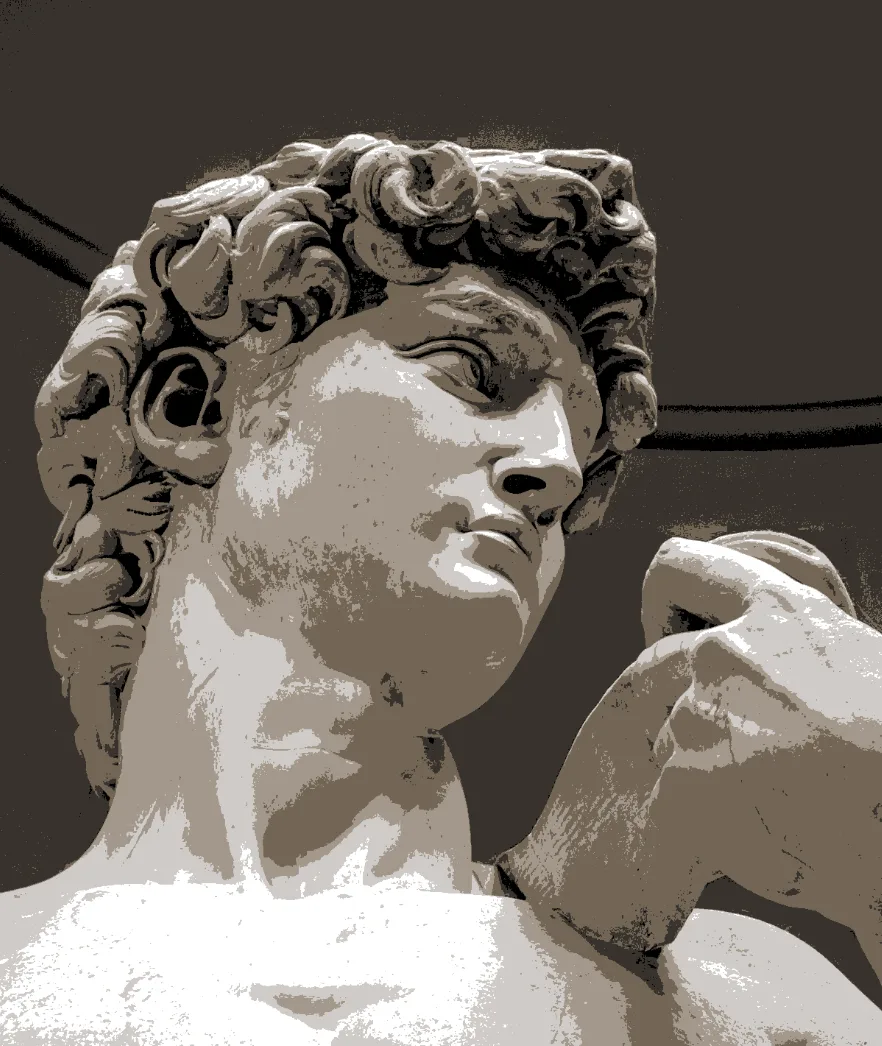
Posterization by value is the digital equivalent of squinting. It takes the thousands of tonal values in a photograph and reduces them to a small number of discrete bands, typically 2 to 6 for serious value study work.
In Lucida, posterization is based on luma. In practical terms, that means the image is grouped by perceived brightness without automatically stripping out hue. That is often useful in the studio: you can see the value bands much more clearly while still keeping some color information visible. If you want a pure value-only view, reduce saturation to 0 separately.
- At 2 values, you get a notan: a two-value light-and-dark design, nothing in between. This is the strongest simplification, and it is extremely useful for checking whether your overall value structure holds up. You can also make this kind of study directly with the free Notan Maker.
- At 4 to 6 values, you start to see the halftones and reflected lights that give form its roundness.
- At 8 or more values, you are approaching the full complexity of the original image, and the study becomes less useful as a simplification exercise.
Most painters find that 3 to 5 values is the sweet spot for practical reference work.
Choosing a Digital Value Study Tool
There are a few different kinds of digital tools that can help with value studies, and they are not equally useful once you are actually in the studio.
Phone apps are convenient for quick checks, especially in the field. Their limitation is that they are usually built around static photos you already took, not around live comparison while you work.
Simple web converters are useful if all you want is a quick posterized version of an image. Upload a photo, reduce the number of value bands, and inspect the result. You can try the free Value Study tool for a fast pre-painting check.
Studio-oriented tools are more useful once the painting session begins. At that point, the question is no longer just "can I posterize this image?" but "can I compare my reference and my work clearly, in the same place, without breaking concentration?"
Why Lucida is different
That is where a browser-based observation aid like Lucida becomes more useful than a one-off converter. Instead of producing a single processed image and stopping there, it lets you keep working from the same setup throughout the session. You can view your reference and your canvas side by side, run posterization in real time, use a live webcam feed, apply grid overlays, correct perspective, and save the session to come back to later.
The advantage is not simply that posterization exists. Plenty of tools can posterize an image. The advantage is that value analysis becomes part of the same viewing setup you are already using to paint from.
Lucida also lets you adjust the posterization more precisely than most simple converters. You can change the number of tonal bands, control smoothness, and adjust thresholds independently. That matters because tonal distribution in photos is rarely even: a high-key portrait may have most of its useful structure compressed into the lighter half of the range, and a fixed equal-step posterization will miss it. Adjustable thresholds let you place the value breaks where the subject actually changes.
A Practical Workflow for Value Studies
Here is a simple way to use digital value studies during a painting session:
- Start with the notan. Before you touch paint, reduce your reference to 2 values. Ask whether the composition still reads. Are the major light and shadow masses clear and well organized? If the two-value design feels weak or confused, the painting will usually inherit that problem.
- Move to 4 or 5 values. Once the large design reads, increase the posterization to 4 or 5 bands. This gives you the middle information: halftones, turning planes, and the major separations inside the light and shadow families.
- Bring the two views into a similar tonal range. If you are comparing a reference and a live camera view of your painting on the same monitor, use the controls to get them visually closer in brightness and contrast. This does not remove every variable, since room light, glare, camera exposure, and monitor settings still matter, but it reduces mismatch and makes comparison more trustworthy.
- Compare while painting, not only before painting. This is where digital tools are genuinely better than a static printout or a quick phone conversion. If both your reference and your canvas can be viewed through the same value filter, you can catch errors while they are still easy to fix.
- Use grayscale deliberately for color mixing decisions. Posterization helps clarify value structure, but in Lucida it does not automatically remove hue. If you want to judge value alone, reduce saturation to 0 and compare the value of the mixed paint to the target. This separates the hue and chroma decision from the value decision, which are easier to judge one at a time.
Common Mistakes
-
Using too many values too early.
Start with 2 values. Structure comes first. Complexity only helps once the big light and dark pattern is already working. -
Treating the tool as a replacement for observation.
A posterized image is a simplification. Use it to clarify your judgment, not to replace it. -
Ignoring the edges.
Value studies do not just simplify masses. They also reveal edge behavior. A hard edge between similar values can create confusion, and a soft edge between strongly separated values can describe form turning.
Getting Started
The fastest way to run a value study on your current reference is simple:
- Open Lucida in your browser.
- Load your reference photo into one of the two panes (or point your webcam at your setup).
- Open the Posterize panel and reduce the image to 2 or 3 values.
- Check whether the light mass holds together.
- Check whether the shadow mass holds together.
- If you want a pure value-only check, reduce saturation to 0 separately.
That small habit change is the useful part. The goal is not to build a perfect digital study every time. The goal is to see the value structure clearly before you commit yourself to paint.
Lucida is a browser-based observation aid for classical and realist artists. It can be used for free, with an optional Pro version for higher limits and additional features. No account required. Learn more.